Scan or photograph
Use a scanner or your phone camera to capture a clear page of printed sheet music.
Bring printed music into your digital workspace. Upload a scan or photo, see the recognized score, and choose how you want to use it next.
Free preview ·$0.50 per source page to download ·$3 minimum
Printed notation · Review your result before using it. Preview for free. Pay only to unlock your downloads.
By converting, you agree to our Terms. Privacy Policy
Want to hear it first? See and play the sample
From the page to your next idea
Use a scanner or your phone camera to capture a clear page of printed sheet music.
Upload the file. The service reads musical symbols and builds a score you can preview.
Export MusicXML for editing, MIDI for music software, MP3 for listening, or PDF for printing.
Less entering notes. More making music.
Optical music recognition reads musical symbols from an image and reconstructs notation. It can save note-entry work while leaving you in control of the final score.
Open MusicXML in your notation editor to correct notes, change the key, or adapt a part.
Use the synchronized preview, download a synthesized MP3, or take the MIDI into your own music software.
Download the newly typeset PDF to print or share, subject to the rights in your original music.
See it. Hear it. Try it.
Play the sample, follow the notes, and download a file to try in your music software.
A little possibility
A SHORT PIECE FOR NEW BEGINNINGS
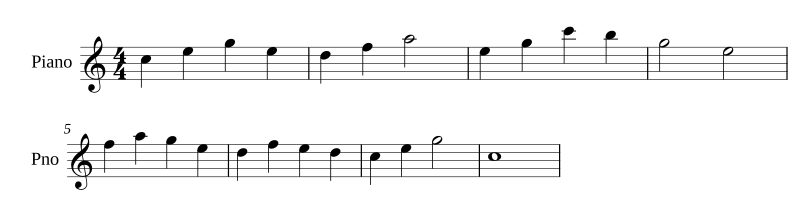
A little possibility
READY FOR YOUR NEXT ARRANGEMENT
Follow the notes as they play. Tap any bar to hear it.
Illustrative sample, not a live conversion. Recognition may need corrections in your notation app.
A little preparation helps
A few useful notes
No. Optical music recognition identifies musical symbols such as noteheads, rests, clefs, and barlines and reconstructs their relationships. Text OCR alone does not turn a score into playable notation.
No. You can use a clear phone photo, an existing PDF, or a scan from a document scanner. Upload a supported PDF, JPG, or PNG file through the browser.
When you start a conversion, the file is uploaded to our processing servers. Access is tied to your browser session or account. Files have a limited availability window; see our Privacy Policy for retention details.
Recognition can make mistakes, particularly with unclear scans, dense notation, or unusual layouts. Use the notation and audio preview to assess the result, then proofread the download in your music editor.
Choose MusicXML or compressed MXL for notation editing, MIDI for note events in music software, MP3 for synthesized practice audio, and printable PDF for a newly typeset score. One purchase covers the available formats for your score.
Preview for free. Unlock every available format for your score, with a guest purchase or a monthly plan.