Bring your PDF
Upload a printed score, whether it was exported from notation software or scanned from paper.
Take the notes off the page and into your next arrangement. Convert a printed score PDF into MusicXML you can edit in your notation software.
Free preview ·$0.50 per source page to download ·$3 minimum
Printed notation · Review your result before using it. Preview for free. Pay only to unlock your downloads.
By converting, you agree to our Terms. Privacy Policy
Want to hear it first? See and play the sample
From the page to your next idea
Upload a printed score, whether it was exported from notation software or scanned from paper.
Compare the recognized score with your original and listen to the audio preview.
Download MusicXML or MXL, then proofread, transpose, or arrange in your notation app.
Less entering notes. More making music.
MusicXML carries musical notation between applications. It gives you notes to work with instead of a picture of a page.
Import the result into your notation editor and transpose it for a singer or a different instrument.
Use the recognized notation as a starting point for a simpler lesson, a new accompaniment, or your own arrangement.
Recover editable material from a PDF when the original notation project is no longer available.
See it. Hear it. Try it.
Play the sample, follow the notes, and download a file to try in your music software.
A little possibility
A SHORT PIECE FOR NEW BEGINNINGS
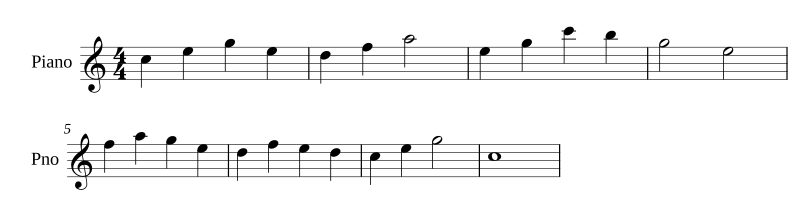
A little possibility
READY FOR YOUR NEXT ARRANGEMENT
Follow the notes as they play. Tap any bar to hear it.
Illustrative sample, not a live conversion. Recognition may need corrections in your notation app.
A little preparation helps
A few useful notes
Yes, if it contains legible printed standard Western notation. Scanned pages and PDFs exported from notation software are both accepted. Faint, skewed, or crowded pages can need more correction.
MXL is compressed MusicXML. Both contain editable notation; the compressed file is usually smaller. Select the smaller-file checkbox within the MusicXML option if your notation app supports MXL.
MusicXML is the interchange format used by notation applications such as MuseScore, Dorico, and Sibelius. Import the file into your editor and review the notation. Layout, fonts, and application-specific details may differ.
The output is newly typeset from recognized musical notation. Page breaks, spacing, lyrics, and markings may differ from the source. Keep the original PDF as a reference and make any corrections in your editor.
You can upload a score and inspect the available notation and audio preview for free. Pay only when you choose to unlock the downloads, or use pages from your subscription.
Preview for free. Unlock every available format for your score, with a guest purchase or a monthly plan.